TikTok LIVE Auction Overlay
A TikTok LIVE auction overlay turns gifting into a bidding war with a prize at the end. Viewers gift to raise their total, the overlay shows who is winning in real time, and whoever is on top when the clock stops takes the item. It suits trading and reselling streams, where one lot follows another all night.
Joined by 40,000+ creators Last updated
What is a TikTok LIVE auction overlay?
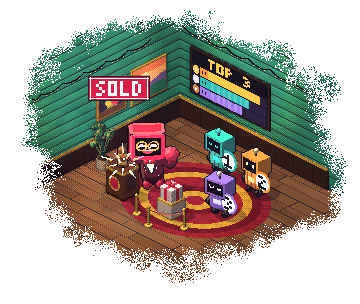
A TikTok LIVE auction overlay displays a live bidding contest on your stream, where a bid is a gift. Each viewer's coin total is tracked, the top three bidders are ranked on screen, and a timer counts down to the moment the highest total wins whatever is on the block.
The format is often called Coin Match, and it fits TikTok trading streams well — Roblox item sales, card breaks, sneaker resales, thrift hauls. Instead of asking for gifts against nothing in particular, you are selling one specific thing and the audience competes for it. The gift stops being a donation and becomes a bid.
What makes the overlay do the work is visible contention. A viewer who can see they are 200 coins behind with forty seconds left has a concrete decision in front of them, and the person who just got overtaken has a reason to come back. Without the overlay you are reading numbers off chat and nobody trusts the count.
Auction and competition formats
All of these run off the same live gift data — pick the one that fits what you are selling.
Coin Match Auction
Highest coin total when the timer stops wins the item, and extra time at the buzzer lets a late bid be answered. 14 themes, from a blocky Roblox-style design to neon.
Throne King
A gift worth your minimum bid takes the throne and restarts the clock. Whoever holds it when time runs out wins the round.
Team vs Team
Two teams instead of individuals: each team has its own gifts, and every one of those gifts scores for its team. It pulls in people who would not bid alone.
Spin Royale
Viewers join with a gift worth your minimum bid, then a wheel picks the winner, or knocks players out until one is left.
Gifter Leaderboard
A top-gifter ranking beside the auction, so a viewer who loses a lot still sees their name on screen.
Wheel of Actions
A break between lots: a gift spins a wheel of outcomes you write, and the one it lands on happens on stream.
Themes, scoring options and per-auction settings are on the auction overlay page.
How to run a TikTok LIVE auction
Set it up once and you can start a new auction per item all stream.
Connect your TikTok username
Sign up free and connect the account you go live with, so the auction receives your gift events.
Pick a theme and a minimum bid
Choose one of the 14 themes and set a minimum bid. A bidder whose total stays below it cannot win.
Set the timer
Choose the auction length. Snipe protection is on by default: when the timer runs out, the auction runs 30 more seconds, once, so nobody wins with a gift at the buzzer.
Copy the browser source URL
Copy the auction overlay URL from the dashboard.
Add it in OBS and start the first lot
Add a Browser Source in OBS, or a Link source in TikTok LIVE Studio, then start an auction from the dashboard for each item you put up.
Button by button: how to run a TikTok LIVE auction with gifts. Full browser source walkthrough: TikTok LIVE overlays guide.
Running an auction that actually closes
The overlay handles the counting. These are the things that decide whether the room bids:
- Say what is on the block before starting the clock
- Keep lots short — several small auctions beat one long one
- Leave snipe protection on so a late bid can be answered
- Call out the leader and the gap by name
- Show the runners-up, not only the winner
- Deliver the item on stream so the next lot is credible
The last one matters most. An audience that has watched you hand over the previous item bids on the next one; an audience that has not, does not. Pair the auction with a leaderboard so the people who lose a lot can still see they are top of the night.
TikTok LIVE Auction Overlay: FAQ
What is a TikTok LIVE auction overlay?
A TikTok LIVE auction overlay shows a live bidding contest on stream where bids are gifts. Each viewer's coin total is tracked, the top three are ranked in real time, a timer counts down, and the highest total when it stops wins the item. It is often called Coin Match.
How do I run an auction on TikTok LIVE?
Connect your TikTok username in BetterTok, pick an auction theme, set the timer and a minimum bid, then add the auction overlay URL to OBS or TikTok LIVE Studio. You start a new auction from the dashboard for each item you put up.
Do bids add up?
Yes. Every gift a viewer sends during the auction adds to their total, so several small gifts can beat one big one. The highest total when the clock stops wins.
Can late bids extend the auction timer?
Yes. Snipe protection is on by default: when the timer runs out, the auction runs 30 more seconds, once, so a gift at the buzzer can still be answered. You can set the extra time from 10 to 120 seconds and allow up to 10 extensions.
What happens if the auction ends in a tie?
With Tie Overtime off, which is the default, the round ends as a tie. Turn it on and a tied round gets extra time, up to 5 minutes, to settle it.
How many themes are there?
There are 14 auction themes, from a blocky Roblox-style design to neon, so the overlay can match your stream's look rather than sitting on top of it.
Is the auction overlay free?
No. Live auctions are part of the Creator plan ($9.99 a month or $99.99 a year), which includes all 14 auction themes. Your BetterTok account itself is free.
Keep building your stream
Turn your next lot into a bidding war
Coin Match bidding, snipe protection and 14 themes for OBS, Streamlabs and TikTok LIVE Studio, on the Creator plan.