BetterTok web app
Nothing to install. Open it in your browser, connect your TikTok and set up your LIVE, on a computer or your phone.
Nothing to install Free to start 300+ overlays Joined by 40,000+ creators
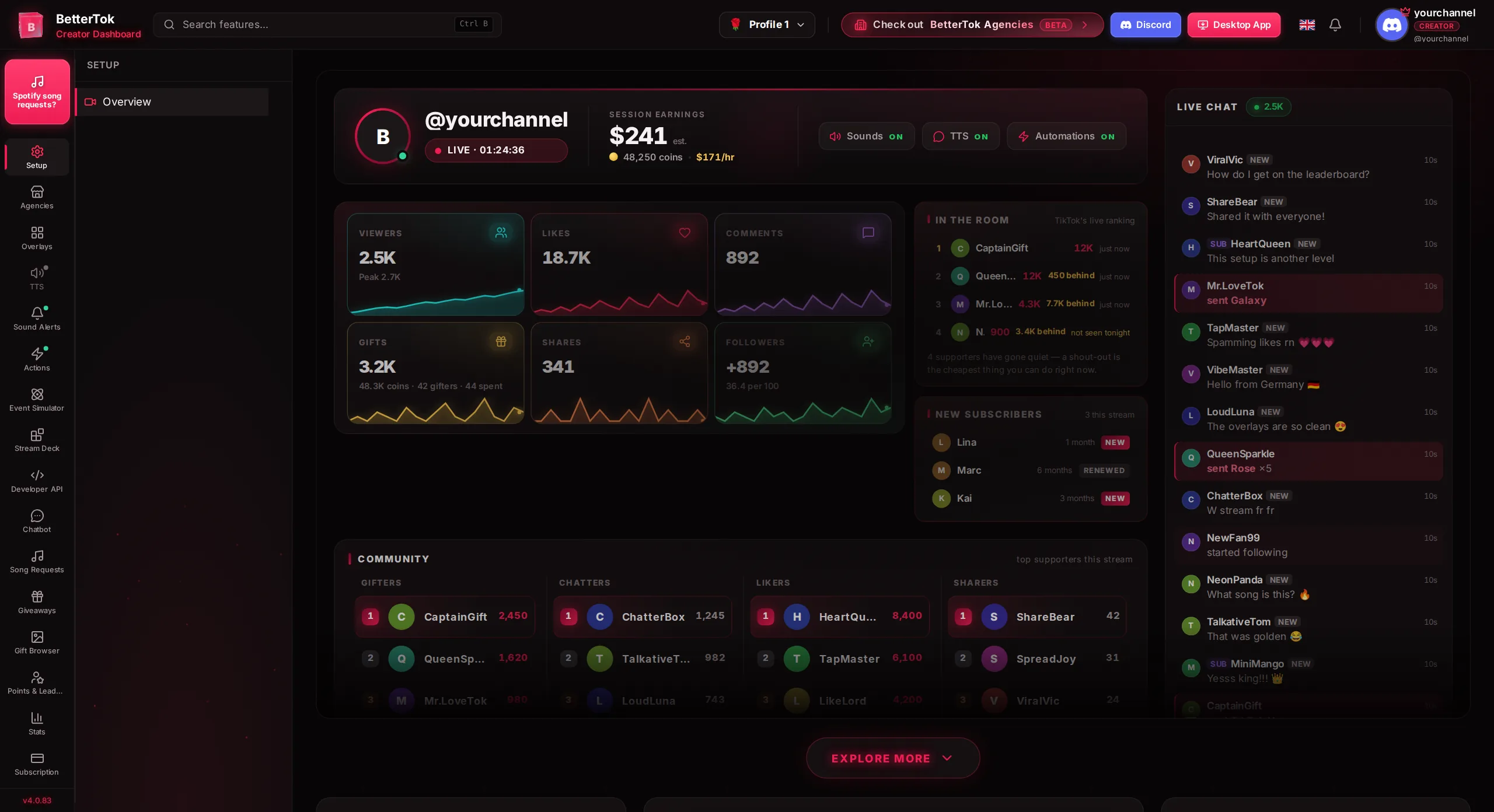
See it before you sign in
This is the dashboard you get.
Set up your LIVE from your phone
No app store and no install. Open it in your phone's browser.
- Home, Overlays, Sounds and TTS are one tap away on the tab bar.
- A menu holds everything else, with a search box.
- Connect your TikTok, pick an overlay and copy its link.
- Change a sound or a voice between streams.
To show overlays on stream you still need OBS or TikTok LIVE Studio on a computer.
What you can do in your browser
All of this runs in a browser tab.
300+ overlays
Goals, leaderboards, alerts, games and more. Copy a link and paste it into OBS or TikTok LIVE Studio.
Actions & Events
A gift, follow or chat keyword sets off alerts, sounds, voices and OBS scenes.
Text to speech
Reads chat and gifts aloud. 150 messages a day on the free plan, or 10,000+ voices on Creator.
Sound alerts
A sound for the gifts and events you pick. 5 sound alerts on the free plan.
Leaderboards
Rank your top gifters and likers on stream, with viewer points you set the rules for.
OBS, Voicemod and Streamer.bot
Control them from a tab in Chrome, Edge or Firefox on the same computer.
Stream Deck
Needs the free plugin. Pair it with your account and fire your actions from real keys.
Free to start
No card needed. A free account gets:
- The free themes of the goal, leaderboard, timer and last follower overlays
- 150 messages a day read aloud with browser voices
- 5 sound alerts
- 5 Actions & Events
Creator is $9.99 a month: every overlay theme, unlimited Actions & Events, and unlimited text to speech with 10,000+ voices.
What needs the desktop app
A few things can't run in a browser. They're one download away, on the same account.
- A chatbot in your LIVE chat
- Song requests from Spotify Premium, or from the Apple Music app on Windows
- Smart lights and plugs
- Key presses for games, on Windows
- OBS on a different computer
Web App: FAQ
What is the BetterTok web app?
It's BetterTok in your browser. Sign in from Chrome, Firefox, Safari or Edge and set up 300+ overlays, Actions & Events, text to speech, sound alerts, giveaways and viewer points with nothing to install.
Do I need to download anything?
No. The web app runs in your browser. Overlays are links you paste into OBS, Streamlabs, XSplit or TikTok LIVE Studio. The optional desktop app adds song requests, a chatbot in your LIVE chat, smart lights and plugs, and key presses for games on Windows.
Does it work on a phone?
Yes. Open it in your phone's browser: a tab bar keeps Home, Overlays, Sounds and TTS one tap away, and a menu holds the rest. There's nothing to get from an app store. To show overlays on stream you still need OBS or TikTok LIVE Studio on a computer.
What's the difference between the web app and the desktop app?
It's the same account, with your overlays and actions on both. The web app needs no install and works on a phone. The desktop app adds song requests, the chatbot, smart lights and plugs, key presses on Windows and OBS on another computer. You can set up on the web and run the desktop app while you're live.
Can I set up Actions & Events from the browser?
Yes, the whole builder is in the web app. Triggers include gifts, follows, likes, shares, chat keywords, Super Fans, level-ups, viewer milestones, battles and polls. Actions can show alerts, animations, images and videos, play sounds, read text aloud, update goals and timers, spin a wheel, add points, call webhooks and switch OBS scenes. With the desktop app they can also send chat messages, press keys on Windows and control smart lights and plugs.
Does the web app support Spotify song requests?
Song requests run in the desktop app, not the browser. There, viewers type !play in your chat and songs play from Spotify Premium, or from the Apple Music app on Windows.
How fast do overlays update?
In real time, as TikTok events arrive: gifts, follows, likes and shares drive your alerts, leaderboards and games while you're live.
Is the web app free?
Yes. The free plan includes the free themes of the goal, leaderboard, timer and last follower overlays, 150 messages a day read aloud, 5 sound alerts and 5 Actions & Events. The Creator plan ($9.99 a month or $99.99 a year) unlocks every overlay theme, live auctions and games, and unlimited text to speech with 10,000+ voices.
Which browsers does it work in?
Chrome, Firefox, Safari and Edge, with no extension needed. To connect OBS, Voicemod or Streamer.bot from the web app, use Chrome, Edge or Firefox on the same computer.
Can I run giveaways from the web app?
Yes. Start a timed giveaway from the dashboard. Viewers enter by typing your keyword in TikTok LIVE chat, and when you end it a random winner is picked from everyone who entered.
Does it track gifts and stats?
Yes. Every plan saves your streams with their stats, gift totals and each stream's top gifters, likers, sharers and commenters. Free keeps the last 30 days and Creator keeps them all, plus viewer trends across streams.
Keep building your stream
Open it. Go LIVE.
Nothing to install and free to start. Sign in and connect your TikTok.